Match Codes
Match Codes
A match code contains the parameters to use when the system tries to automatically match statement rows to transactions. The system will already have installed a DEFAULT code, you can look this up using the lookup box at the top, or create a new code by typing into the fields.
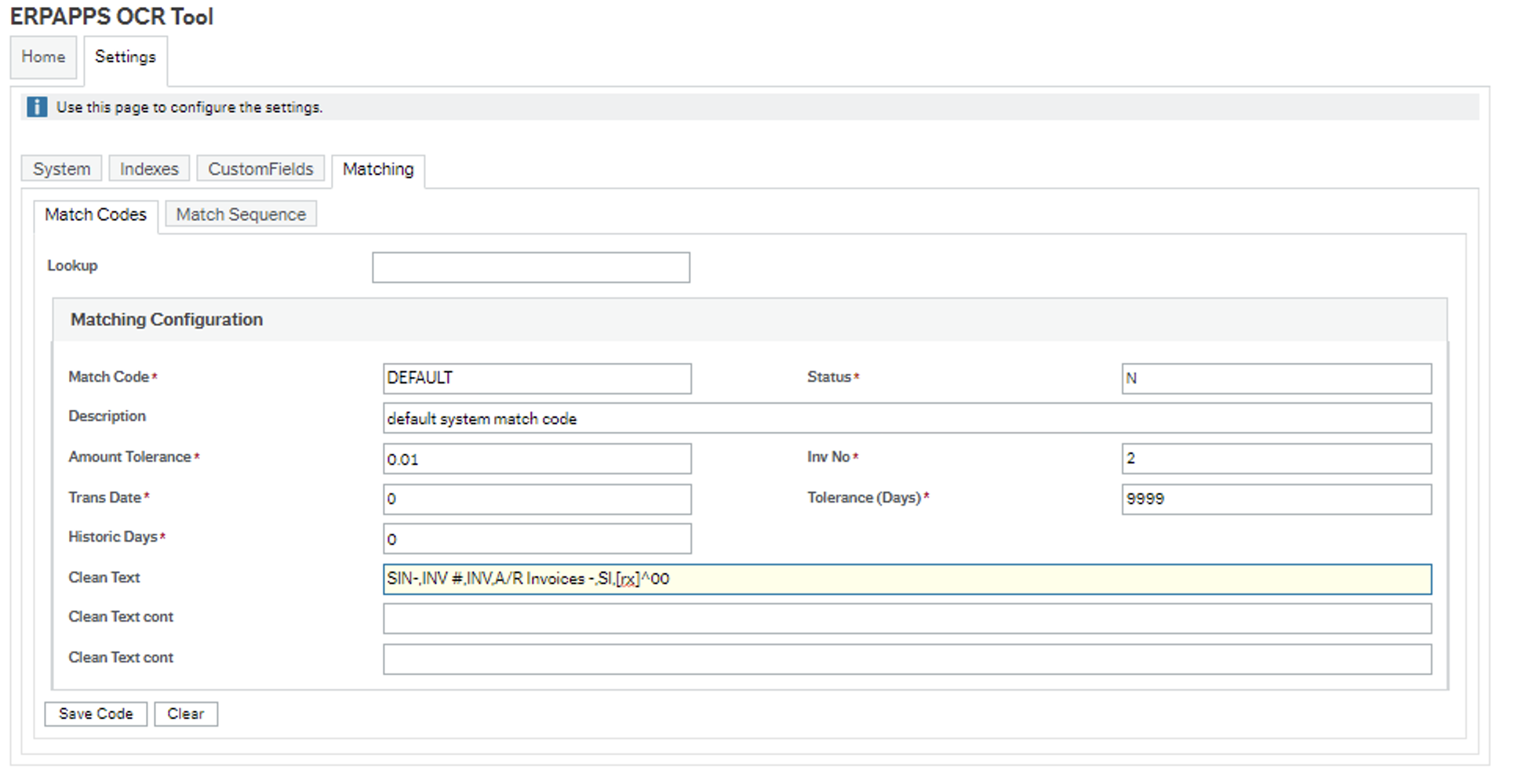
The match code
Match Code A unique code for the match
Status N is active
Description Freetext description
Amount Tolerance the absolute allowable difference between the statement amount and the transaction amount. This will be checked to the transactions cur_amount column.
Inv No Used to control how statement invoice references are matched to transaction invoice references. Possible options are:
- 0: Ignore: only use date and amount
- 1: ERP Invoice number (ext inv ref) must be WITHIN any field (Int / Trans number, description, reference)
- 2: Match ERP Invoice number (ext inv ref) to any statement field (Int / Trans number, description, reference)
- 3: Statement Inv / Trans number must be WITHIN ERP Invoice Number (ext inv ref)
- 4: Statement Inv / Trans number must match ERP Invoice Number (ext inv ref)
Trans Date Used to define which ERP field to match the statement transaction date to. Possible options are: 0: Try either date 1: Use voucher date 2: Use trans date
Tolerance(Days) Linked to the trans date, defines how many days difference there can be between the statement date from field and the date field(s) defined by the above Trans Date setting.
Historic Days The number of days for which status C transactions should be loaded, note if this field is set to 0 then the system setup value will be used. Any other value will over-ride the system setup value.
Clean Text(1-3) Thus works in combination with the Inv No setting above.
These can be used to clean specific text out of statement fields (Invoice Number, Reference, Description) to improve matching against transactions.
For example a supplier may add some specific text to an invoice number to the statement but not on the original invoice. This should be a comma separated list of values and you may also use regular expressions in this field which should be preceded with [rx] so we know it is a regular expression.
The default code includes some common replacement values you can see as an example.