Document Details
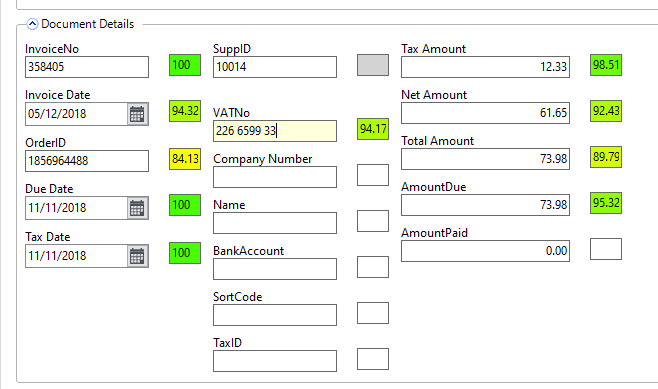
This section is where the header level information is returned by the OCR system.
Each field also has an additional confidence marker which is RAG rated and shows the percentage confidence the OCR system has in the piece of data.
In this field you can alter or add data in the fields and if applicable this will also update the index fields.
Note
if you re-download the OCR data at any point after making changes then this manual data will be overwritten including the supplier ID
SuppID is a special case
We use some logic to try and determine what the Supplier ID might be for the invoice.
The other details returned from the invoice can be used to try and map this.
The following fields can be captured from the invoice are tried in this order and will return the supplier ID from the first exact match that it gets
-
Order id
-
Company registration number
-
VAT registration number
-
Supplier Name
-
Bank account
-
IBAN
-
Finally it will default to the setting in the System Setup Value ERPOCR_DEFAPARID