Prerequisites
-
A valid license key from your reseller, having provided a list of client codes you wish to use the product for
-
The technical installation should have been completed
-
The team will have set up your Rossum extraction queue. You may request some customisation to this if required such as
- Delete recommendations (https://knowledge-base.rossum.ai/docs/delete-recommendations-in-rossum)
- Maximum number of pages to try and extract initially, i.e. if most of your invoices are single page then you can tell the system to only automate the extaction from the first page. Subsequent extraction can be manually undertaken from additional pages. This helps reduce your billing costs but may reduce automation as this is a queue-wide setting.
Consolidated Invoices
Warning
IMPORTANT FOR ALL USERS
Important: Even if you are not using consolidated invoices, please take note of this section and ensure our default EI02 variant of 888 does not clash with your existing setup
The EI02 process as standard is unable to handle consolidated invoices, therefore if you expect to receive any consolidated invoices it is very important that you link your EI02 variant to the OCR custom code.
This is handles under settings > customisation tools> ACT > ACT Setup.
Open the screen and use the LOAD button to load it, then navigate to the "Server Extensions" tab.
In the list of items locate erpapps.OCR.EI02 extension:
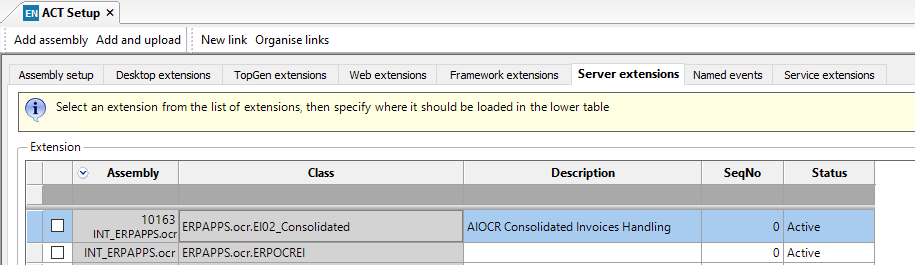
In the "usage" box below you will note it includes a variant of 888 to try and avoid any clashes with existing setups so a variant of 888 should be used for the EI02 for OCR if you use consolidated invoices.
This is because if we do not hard code a variant, the system would apply to ALL EI02 variants until this screen is restricted, so can cause a problem with other EI02 if there is a delay between installation and configuration (e.g. on cloud).
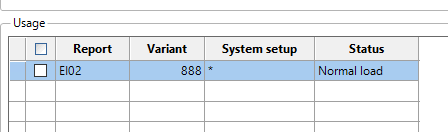
Save the screen.