16th October 2023
Info
This is a significant release which combines some major features, improvements and a screen redesign.
While the build has undergone a large amount of internal testing we, as always, highly recommend that you test the release thoroughly on a test system prior to promoting to live to ensure it works as expected in your environment.
Warning
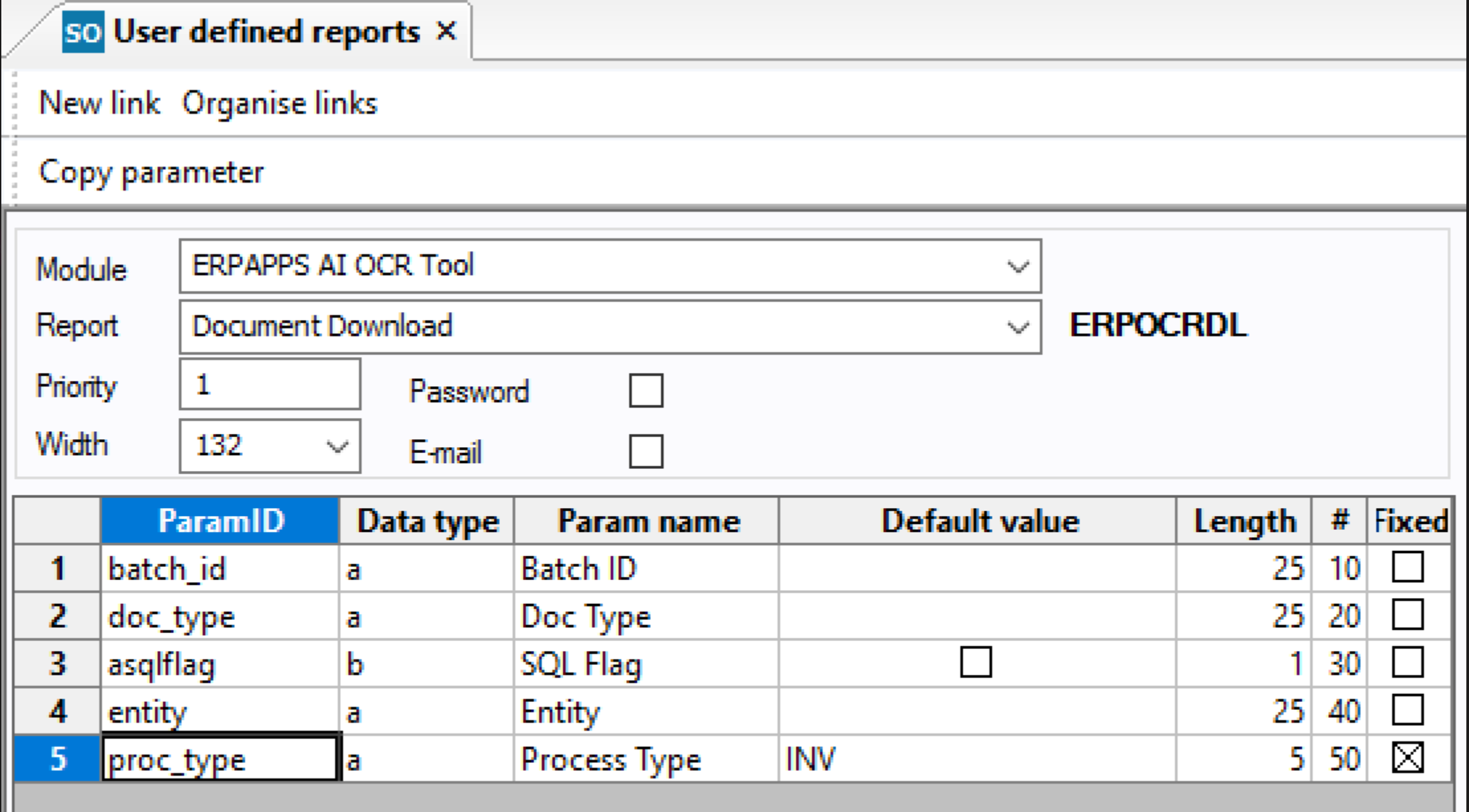
There is a bug in the installer for the latest version and its not adding the additional report parameter to the ERPOCRDL report which downloads documents from the OCR system.
This is fine if run from the screen as the system will insert it, but if set up on a schedule then the download fails to update the "remoteid" at a certain point which means the document has lost its connection to rossum.
The parameter is very simple and should be manually added to the user defined report (row five below) The default should be set to INV unless you are statement processing:
Major
[FEATURE] Statement matching system has now been merged (use windows options to hide this part of the screen if not required)
[FEATURE] PRODUCTION Usage information is now available via our middleware (this is not available for test systems). You will need to allow your firewall to connect to this url: https://erpocr-billing-app.azurewebsites.net/api/BillingInformation
[FEATURE] The install asql script has been improved to automatically add new SSV values. Existing values should be retained but please test this on a test system first. SSV will be backed up into aagsysvalues_erpocr_bak until the next time the script is run.
[FEATURE] The AP row can now be coded in the screen and defaults added. You will need to add the new SSVs for this if you do not run the asql script
[FEATURE] Copy row button added for invoice lines, creates a duplicate of the row and attached coding
[FEATURE] Documentation has now been moved online and a link is provided from the home page.
[FEATURE] ERPOCR_WARNING_FLAGS new system setup value which will only show these flags as warning type so you are able to exclude ones you don't wish to see. See the full list here
[TECHNICAL] ORACLE compatibility merged.
[TECHNICAL] Invoice screen has undergone a redesign to make more information visible on the lines due to the limitations in the screen rendering by ERP.
Minor
[FEATURE] If you have one document type defined in ERPOCR?_DOCTYPES SSV it will now default in the email app screen
[FEATURE] New SSV ERPOCR_DEF_QTY which can be used to default the quantity into the screen on lines
[FEATURE] New QTY flag which can be used as a warning or blocking flag
[FEATURE] AP line description is now presented in a box and can be added to all lines
[FEATURE] Account code is displayed against lines where it is coded or from the purchase order line (but can not be edited)
[FEATURE] statement matching warning when matching non balancing statements but still allow it
[FEATURE] statement matching added ERPOCRSTAT_DOCTYPES system parameter to limit the list
[FEATURE] statement matching output report defaulted to excel and minor improvements
[FEATURE] statement matching new confirmation messages on save matching code / sequence
[BUG] ORACLE date formatting issues on manual updates now resolved
[BUG] When the invoice had an order_id which does not exist in Unit4, it would incorrectly aggregate the detail lines up to one
[BUG] bugfix with statement report for older report engine versions
[BUG] Resolved issues if you turned admin access on and didn't add any roles
[BUG] Legal entity selection now cleared on clear or re-open
[BUG] statement matching fixed link to queue button
[BUG] statement matching improvement to the mark complete function
[BUG] statement matching codes and sequences only returning the first item on lookup
[BUG] statement matching ensure matching tables are cleared when the supplier is manually changed
[BUG] statement matching ensure status C items are not left in the unmatched table
[BUG] statement matching document status now correctly shows in information text
[BUG] statement matching how hidden prior to legal entity selection
New System Setup Values in this release
- ERPOCR_AP_CODING
- ERPOCR_AP_DIM1
- ERPOCR_AP_DIM2
- ERPOCR_AP_DIM3
- ERPOCR_AP_DIM4
- ERPOCR_AP_DIM5
- ERPOCR_AP_DIM6
- ERPOCR_AP_DIM7
- ERPOCR_AP_TC
- ERPOCR_AP_TS
- ERPOCR_WARNING_FLAGS
- ERPOCR_DEF_QTY
- ERPOCR_DEF_RESP
- ERPOCRSTAT_DOCTYPES
- ERPOCR_USAGE
- ERPOCR_USAGE_KEY
- ERPOCRSTAT_BLOCK_TOREVIEW
Known Issues
- We are aware with an issue with the indexing fields where a manual update is not possible on some fields, this appears to be a browser issue and we are working to resolve it. Index fields which are automatically filled and updated by header fields are not affected and updating the header field manually will result in the index field updating.