Status Codes
During the lifecycle of the document it will have various status descriptions.
These relate to its status in Unit4 ERP as well as its status on the Rossum OCR platform.
Uploaded to ERP Unit4: The document has been uploaded to the custom UERPOCR* tables
Uploaded to OCR Unit4: The document has been sent to Rossum for processing.
importing OCR: Document is being processed by the AI Core Engine for data extraction; initial state of the document.
failed_import OCR: Import failed e.g. due to a malformed document file.
to_review OCR: Initial extraction step is done and the document is waiting for user validation as it is not confident in its extraction.
reviewing OCR: Document is undergoing validation in the user interface.
confirmed OCR: Document is either automatically confirmed by the OCR as it is within acceptable tolerances or manually confirmed by the user.
exported OCR: Document is validated and successfully passed all hooks; this is the typical terminal state of a document.
deleted OCR: Unit4 ERP has sent the deletion request to Rossum
Downloaded from OCR Unit4: The data has been pulled back from the OCR system
Transferred Out Unit4: The data has been transferred to the document archive or EI02 but there was a problem deleteing it.
Complete Unit4: The documents have been manually marked as completed
ERP Deleted Unit4: The document has been deleted from all the custom UERPOCR* tables except for a header row.
Additional Rossum Status Codes
There are two additional status in the Rossum system which should not appear in Unit4 ERP
postponed Operator has chosen to postpone the document instead of exporting it. This would have to be done manually via Rossum, this status may briefly appear in Unit4 but would likely be overwritten with Downloaded from OCR.
purged Only metadata was preserved after a deletion. Once an invoice reaches this point it should have been removed from all ERP tables so will not show.
Rossum System Identifier Codes
There are also three "special" status codes which do not show in the status column at all as these relate only to the processing of documents from a source other than Unit4 ERP. That being via email, via the app, uploaded directly in the Rossum webpage or a split PDF.
They will be assigned these status which are only available via the Rossum webpage and the APIs
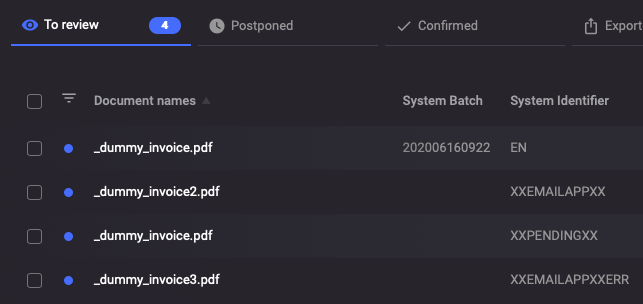
The top row shows a normal invoice, it has a Unit4 ERP batch number and client.
XXEMAILAPPXX The second row shows an invoice received from an external source which is awaiting someone to pick it up from Unit4 ERP.
XXPENDINGXX This invoice has been selected for download via Unit4 ERP and is currently being processed into a batch.
XXEMAILAPPXXERR This invoice had an issue when trying to add it to a batch, it will be picked up in the next download and tried again.