15th July 2024
This release introduces some minor bugfixes for errors in specific circumstances and some new report features to assist certain clients in managing workloads.
Major
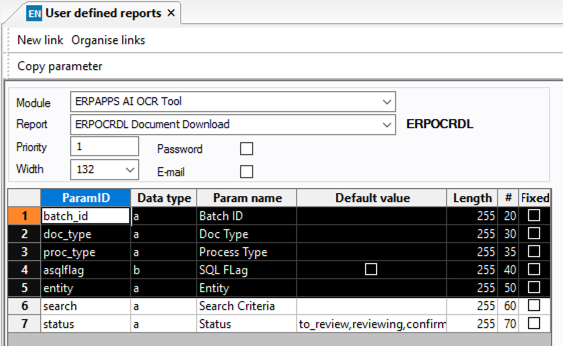
[OA-276] [FEATURE] document download improvements
The document download report can now be filtered by status and also with additional column filters. Additional report criteria required for existing users, please add these two parameters (Search and status) to your user defined report. Note when run from the email app screen, the system will automatically insert these parameter to the report run.
[OA-281] [FEATURE] download raw data
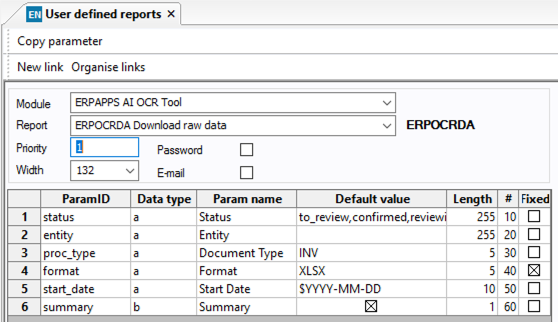
BETA: There is now a new Download raw data report (this should be created manually for existing users, see below). This can be used to extract all data from a queue with filters, however please note there is a limitation on the data that can be downloaded. If you are exceeding this you will see a 400 error in the logfile, you should further restrict your parameters to ensure less data is returned.
Please note this is a report to be run manually, not from the screen.
For existing users who want this features, you will need to add this to the user defined menus screen and subsequently the user defined reports screen.
User Defined Menu
Please configure the user defined menu as below, note your ID, Par Menu ID, # and Menu ID will vary based on your installation:

| Co | ID | Bespoke | Std. module | Std.ID | Func.type | Function | Argument | Par. menu ID | Program | Menu text | Variant | # | Menu ID |
|---|---|---|---|---|---|---|---|---|---|---|---|---|---|
| * | 5 | 1 | Server process | ERPOCRDA | a:ERPOCR.ocr:ERPOCRDA | 91 | a:INT_erpapps.ocr | ERPOCRDA Download raw data | 105 | 95 |
User Defined Report
Once you have configured the menu you should be able to set the report up as below:
Minor
[OA-321] [IMPROVEMENT] Further controls to avoid download report running without a document type
[OA-333] [BUG] Fixed issue with a null description being generated when certain parameters were set and no lines were generated from OCR
[OA-332] [IMPROVEMENT] Added a cloud flag to the front screen
[ISD-128] [BUG] Resolved issue with the dynamic attribute value lookps on the AP coding row
[OA-331] [IMPROVEMENT] Add a better error message when using apply description to all rows and it is blank
[ISD-129] [BUG] Resolved issue with error message showing on setting gl coding decoration
[ISD-125] [BUG] Resolved issue with screen crashing when trying to apply description to all rows, when no AP line description available
New System Setup Values in this release
New Invoice Flags introduced in this release
Known Issues
- We are aware with an issue with the indexing fields where a manual update is not possible on some fields, this appears to be a browser issue and we are working to resolve it. Index fields which are automatically filled and updated by header fields are not affected and updating the header field manually will result in the index field updating.