Documents
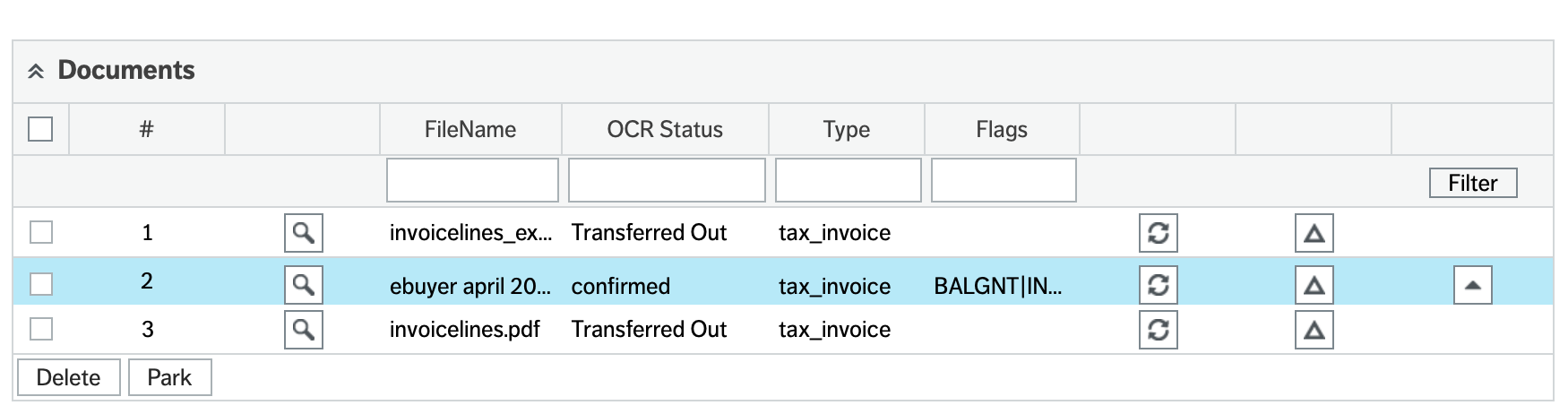
This is the table of documents in the batch and controls the screen and actions for each individual file. Selecting a row will load the document and all details into the screen.
Status There are various status that a document can be at, these are shown in the status codes section.
It is important that all documents which have fallen to to_review are reviewed as this is how the AI system learns and adapts to your capture requirements.
Flags The flags column shows the outcome of checks we have made, some flags can stop invoices processing further. These are explained in detail on the flags page
Action Buttons Each row has a set of three buttons, you must have selected the row prior to using the buttons (the row goes blue as in the image above) not simply checked the box. This activates the row and means the system knows which row is being processed.
 the review screen when the document is at the to_review, reviewing or completed states. See document reviewing
 file to the OCR system. The original will be deleted from the OCR. The file will remain attached to the current batch. Note this is hidden as standard but can be unhidden via windows options.
 data just for that single file, it is used to refresh the data after reviewing in the web or if the reviewing has been done externally to Unit4 ERP.
 clear the flags and allow processing (where appropriate)
Deleting You are also able to delete documents in this section by simply selecting the checkbox(es) and using the delete button which will become active.
Parking This button simply sets the PARK flag on the document which should be set as a blocking flag.