Further Information
ERPOCR_TAX_CODES
Allows you to set default tax codes to be used on non PO invoices.
The expected input is: rate1,currency1,taxcode1,taxsystem1|rate2,currency2,taxcode2,taxsystem2
For example:
20,GBP,UK,UK|0,*,0,|5,*,5P,|20,EUR,20,EU
There are three outputs here which will be tested in the order they are written.
If the vat percentage (within a 0.49 percent tolerance to allow for roundings) is 20 and the currency is GBP then the tax code will be set to UK and the tax system to be UK
If the vat percentage (within a 0.49 percent tolerance to allow for roundings) is 5 and the currency is anything then the tax code will be set to 5P and the tax system to be blank
If the vat percentage (within a 0.49 percent tolerance to allow for roundings) is 20 and the currency is EUR then the tax code will be set to 20 and the tax system to be EU
Additional System Setup Values
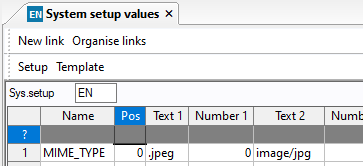
You may need to configure MIME type SSVs to enable some files to display correctly