EI02 Important For All Users
Consolidated Invoices [Important for all users]
Important: Even if you are not using consolidated invoices, please take note of this section and ensure our default EI02 variant of 888 does not clash with your existing setup
The EI02 process as standard is unable to handle consolidated invoices, therefore if you expect to receive any consolidated invoices it is very important that you link your EI02 variant to the OCR custom code.
This is handles under settings > customisation tools> ACT > ACT Setup.
Open the screen and use the LOAD button to load it, then navigate to the "Server Extensions" tab.
In the list of items locate erpapps.OCR.EI02 extension:
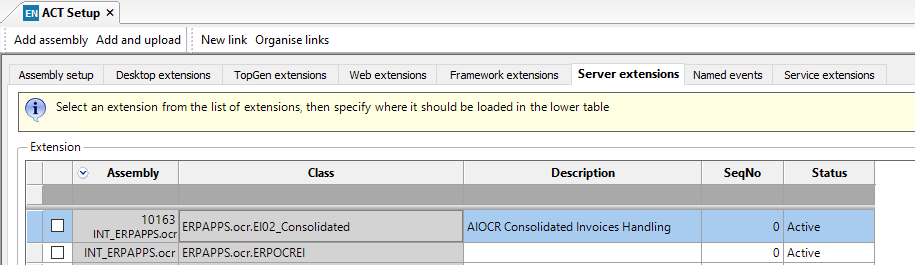
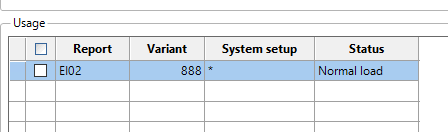
In the "usage" box below you will note it includes a variant of 888 to try and avoid any clashes with existing setups so a variant of 888 should be used for the EI02 for OCR if you use consolidated invoices.
This is because if we do not hard code a variant, the system would apply to ALL EI02 variants until this screen is restricted, so can cause a problem with other EI02 if there is a delay between installation and configuration (e.g. on cloud).
Save the screen.